Repair
Restore torn and ripped photos with AI
A photo that's been folded, torn, or creased can be repaired automatically. The AI recognizes the damage line, reads the texture and tone on either side, and paints the seam back in so it disappears.
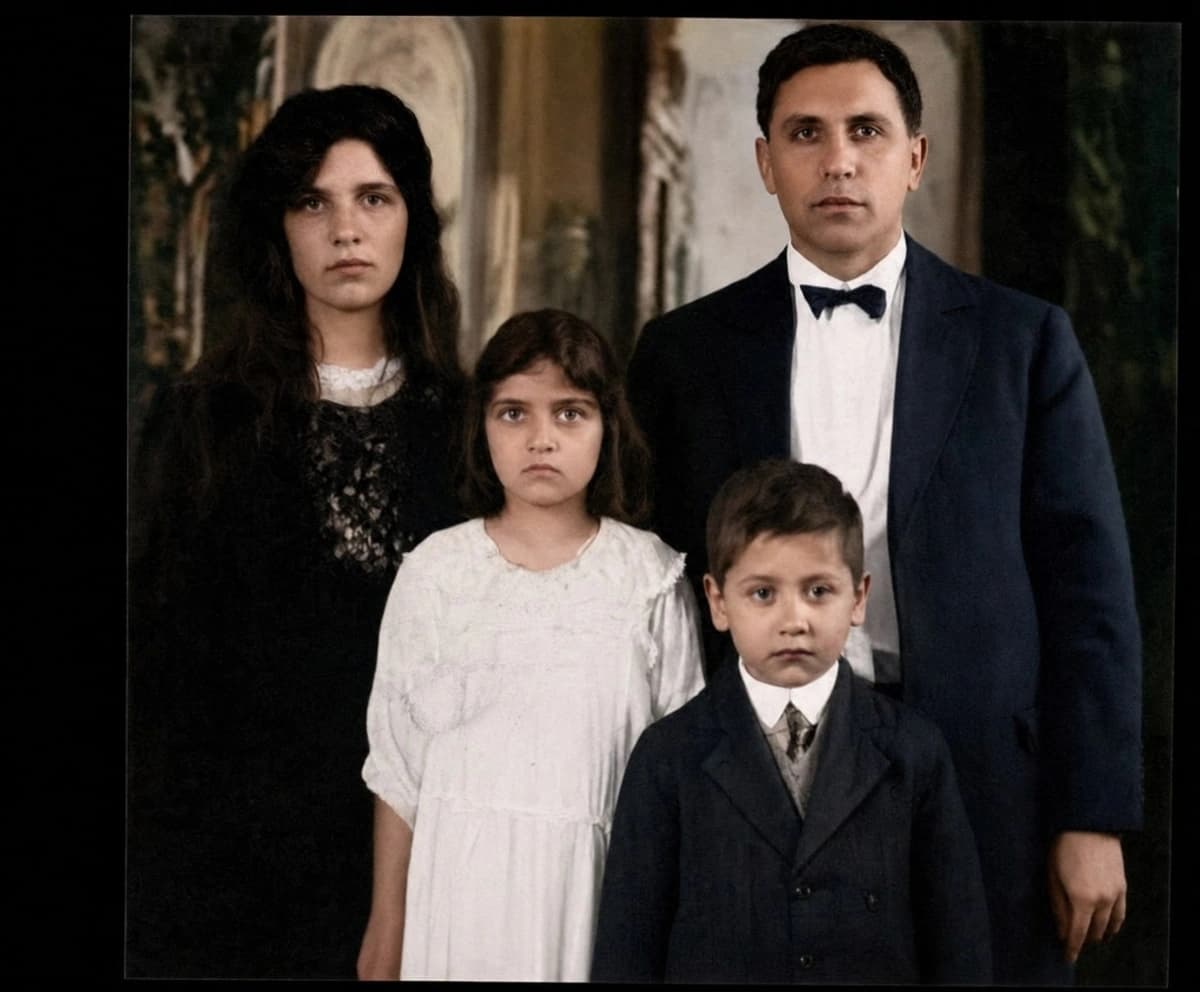
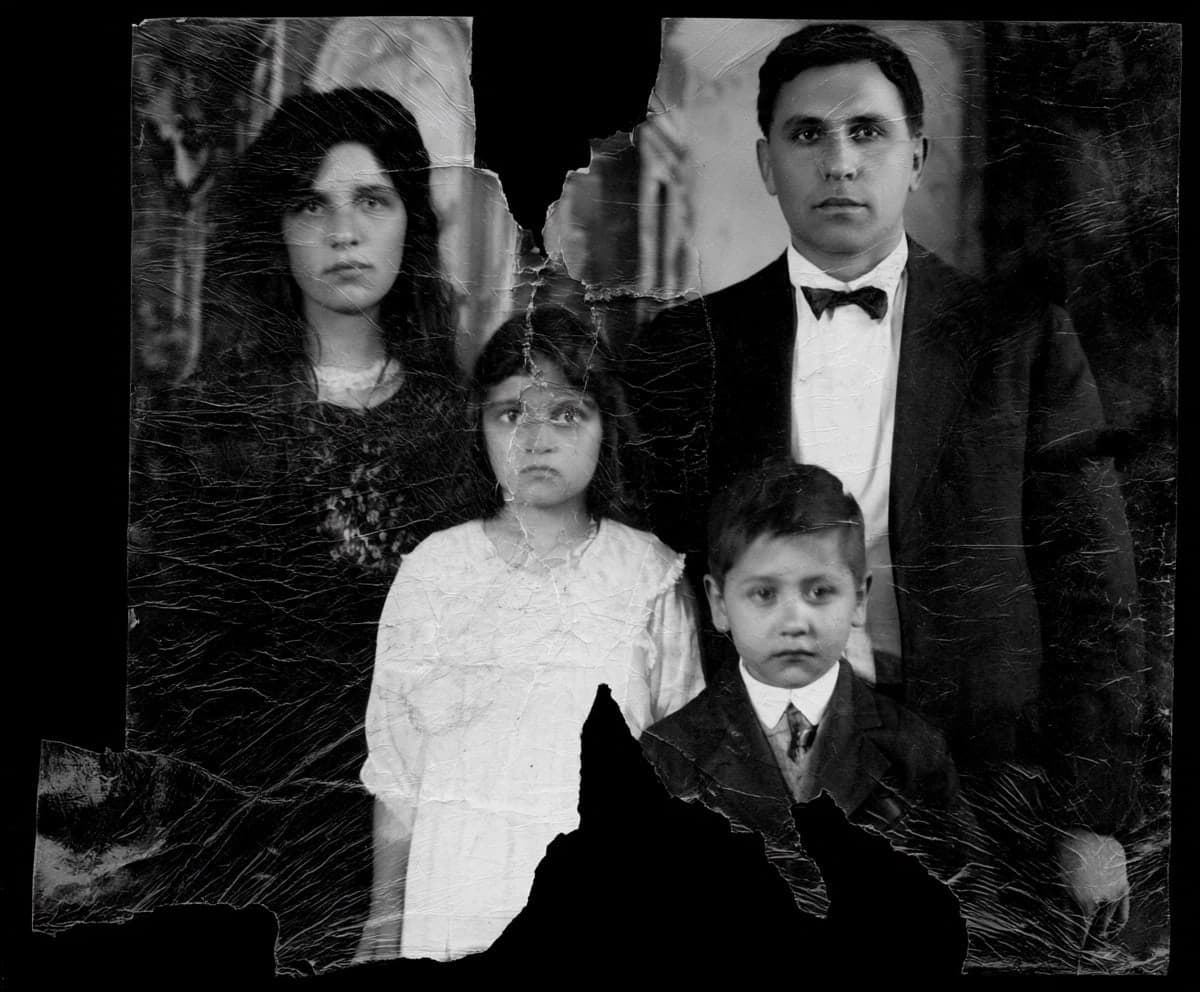
Drag the slider to compare.
Tape it, scan it flat, then upload
If the photo is in pieces, line them up and tape the back — not the front. Scan it flat on a flatbed if you can, so the lighting is even and the edges meet cleanly. The model bridges a clean seam far better than a gap where paper is missing, so the more you align the pieces, the less the AI has to invent.
What it can and can't rebuild
A crease across a background or clothing restores almost perfectly. A tear straight through a face is harder — the AI reconstructs features, and on a large missing area it's guessing. The result is usually convincing, but check the face carefully. A small honest flaw beats a confidently wrong eye.
Tape marks, sticky residue, and stains
Old repairs leave their own damage. Cellophane tape yellows and leaves a sticky, discolored band; sticker albums lift the emulsion; spills leave rings. The AI treats these like any other surface defect — it reads the intact image around the mark and rebuilds the tone underneath. You don't need to remove old tape first, and you shouldn't try to peel it off a fragile print; just scan it as it is and let the model even out the discoloration.
When a piece is missing: rebuilt vs. invented
There's a real line between repairing damage and inventing content. A thin tear loses almost no information, so the repair is reconstruction — the AI has the surrounding detail to work from. A missing chunk is different: nothing under it survives to recover, so the model fills it with something plausible. On a patterned background or sky that's invisible; over a face, a hand, or printed text it's an educated guess. Keep the irreplaceable parts in mind when you judge the result.
Will it still look right when printed?
Screen-perfect isn't the same as print-perfect. The AI works at enough resolution that a reprint at the original size holds up, but a heavily damaged area that looked fine small can show its seams enlarged. If you plan to print big, view the result at full size first and check the repaired regions — a face that's convincing on a phone deserves a closer look before it goes on a wall.
Creases, pressure cracks, and emulsion flaking
Not every 'tear' is a clean split. A crease folds the paper without separating it; a pressure crack spider-webs the emulsion while the backing stays whole; and old flaking lifts a chip of the image away. The AI reads each of these as a break in the surface and rebuilds the tone across it, so a creased face or a cracked sky comes back smooth. Heavy flaking, where the picture layer is physically gone, is the one case where it reconstructs rather than recovers — fine on a background, worth a careful look on a face.
Photos stuck in a magnetic album
The self-adhesive 'magnetic' albums from the 1970s and 80s are a common source of damage: the glue yellows the print and bonds it to the page. Don't yank a stuck photo free — you'll tear it. Slide a thin tool under a corner if it lifts easily, or just scan the photo right on the album page if it won't budge. The AI handles the yellowing and any tearing that already happened; saving the image matters far more than saving the paper it's stuck to.
Common questions
Can a ripped photo be fixed without Photoshop?
- Yes. You don't need any editing software or skills — upload the scanned photo and the AI repairs the rip itself. That's the whole reason it exists.
My photo is torn clean in half. Will that work?
- Usually well, because nothing is actually missing — the halves are just separated. Tape the two pieces together on the back, scan them flat, and the AI rebuilds the seam. The cleaner the two edges meet, the better.
Will the repair look natural when I print it?
- On areas with surviving detail, yes — reprints at the original size hold up. Check any large rebuilt region at full size before printing big, since invented detail shows more when enlarged.
My photo is missing a whole corner. Will that work?
- Partially. The AI will fill the corner with plausible background, but it can't recover detail that no longer exists. Backgrounds rebuild well; missing faces or text do not.
Should I fix the tear in Photoshop first?
- No need. Upload the taped-and-scanned original — the model is built to handle the seam itself.
Try it on your own photo
Upload one photo and see the result in about a minute. Start with the one that matters most.
Get started